Thursday, October 4, 2012

Software Releases • Tigers Live Wallpaper v1.0

Tigers Live Wallpaper v1.0
Requirements: Android 2.1 or higher
Overview: If you're looking for an exquisite live wallpaper inspired by some of the most beautiful wild animals, Tigers Live Wallpaper is the perfect choice for you! Enrich your phone with the loveliest images of white and Bengal tigers and enjoy their beauty any time!
Image
Image
Image

- Perfect live wallpaper for Android!
- Interactive background-Tap anywhere on the screen and new tigers will appear!
- Full support for landscape mode and home-screen switching!
Enjoy this lovely, free and useful live wallpaper!

More Info:

Software Releases • Rose Forest Live Wallpaper v1

Rose Forest Live Wallpaper v1
Requirements: Android 2.2 or higher
Overview: Rose Forest Live Wallpaper
The sparkling glitter that can be changed is so pretty on the phone!
ImageImageImage

Welcome all! This is a brand new live wallpaper no one else on the market has anything like this!
This adorable completely interactive live wallpaper is so pretty and looks fantastic on any phone. You will see a random display of sparkling stars. And you will see once you swipe your finger across the screen a trail of sparkling stars will linger over the screen. You can change the color of the glitter to any color you wish to have you can tweak the colors to pick just the perfect one to match the picture behind the stars or you can choose just a regular old joe color. You can choose from 3 sizes of glitter small, medium or large. You can choose the frequency of the glitter that appears on the screen from fast, medium speed or slow. You can enable or turn off the option to have the touch feature for the trail of sparkles on the screen and you can enable or turn off the option for the random popping up glitter. There is a battery performance setting. I have the Samsung Galaxy s3 phone and its very powerful so the glitter sort of goes all over the place. I find it best works for my powerful phone on the power saving mode.

This is a premium live wallpaper, in order to keep it free we have installed ads in it.
You can optout the ads from the links provided in the ads
To delete the icons just hold your finger on them and drag to the trash can to delete.
You can request a paid version if you wish to buy the app ad free

This app has ads

More Info:

Software Releases • Beejive IM - Instant Messenger v4.2.3

Beejive IM - Instant Messenger v4.2.3
Requirements: 2.1 and up
Overview: Instant message, chat, & IM on AIM, Yahoo, GTalk, MySpace, Jabber, Facebook, MSN

Image


Instant Messaging Anywhere - chat with all your IM friends in one app!

BeejiveIM Instant Messenger! Chat on AIM / iChat, Windows Live Messenger / MSN, Yahoo, Google Talk, Facebook, Jabber, MySpace, and ICQ! BeejiveIM is an all-in-one instant messaging app that allows you to message all your IM buddies anywhere you go!

See what reviewers are saying:

"With support for just about every major IM protocol we ever find ourselves using alongside things like voice/image transfers, Beejive was already our IM client of choice... Background notifications really just sealed the deal, and anything else they’ve added was just frosting on the already delicious cake."
-- TechCrunch

"Overall, after testing various IM apps, Beejive is by far my favorite. The interface is slick and beautiful."
-- Wired

"BeejiveIM is an incredibly full-featured IM client, boasting capabilities that almost put it on par with desktop IM clients."
-- Macworld

"Beejive IM is one of those mobile multi-network chat clients that's a joy to use--it's fast, graphically rich, and just works."
-- CNET

"BeejiveIM is a feature rich, multiprotocol instant messaging client that blows the pants off any other chat program offered in the App Store."
-- 148Apps.com

Key Instant Messaging Features:
* Save Money: Chat using your existing data plan, no per-message charges.
* Reliable and Efficient: Be connected 24/7 and it's gentle on your battery.
* Push Notifications: Be connected even after you close the app. Get notified instantly when you get a new message (requires OS 2.2+).
* Stay Connected: Works with multiple instant messaging networks and multiple accounts per network: AIM®/iChat, MSN®, Yahoo!®, Google Talk®, Facebook Chat, Jabber, and MySpace IM.
* Share Files: Send and receive files, including pictures and voice notes.
* Universal Interface: Optimized for both tablets and phones.
* Highly Customizable: Choose your color theme, chat wallpaper, buddy list styles, and more!
* No Sign-Up Required: Just sign in with your existing IM accounts, no need to sign up for anything!

Chatting Features:
* Real-time Chats: Quickly switch between multiple simultaneous chats.
* Group Chats: Chat with multiple buddies in one conversation on AIM, Yahoo, GTalk, MSN / Windows Live, and Jabber.
* Send Text Messages: Send text messages to anyone in your phone book through AIM or Yahoo SMS out (requires AIM or Yahoo account).
* Full Unicode Support: Chat in any language supported by your Android device.
* Landscape Option: Type with a larger keyboard.
* Save Chats: Email your chats to save your chat history.
* Hyperlink Support: Automatically parses links for web pages, YouTube videos, email addresses, twitter usernames, and phone numbers.
* Emoticons Support.

Account & Buddy Features:
* Full Featured Buddy List: Sort, group, and easily search through your buddy list.
* Buddy Pounce: Receive an alert when your friends come online.
* Manage Your Buddies: Including support for add/remove, nicknames, groups, block, and approve/deny requests.
* Control Your Availability: Set auto-away and custom status messages, be invisible, change privacy controls.
* Configurable Alerts: Customizable sound and vibrate settings.
* Buddy Icons: View your friends' icons, set your own.

Beejive's reliable and efficient networking has been tested and proven on multiple platforms. Move from cellular and wifi connections seamlessly. Stay connected after you close the application and be notified when you get a new message through push notifications (OS 2.2+). After being out of coverage BeejiveIM automatically reconnects and picks up where you left off.

BeejiveIM uses your phone's existing data plan or wifi connection, so you can save money by reducing your text messages.

What's in this version:
v4.2.3
- fix for Yahoo & MSN authorization errors on login
- Various bug fixes & enhancements
New in version 4!
- brand spanking new design!
- new interface for all tablets!
- added buddy online alerts (buddy pounce)
- new SMS style text input in chats
- added new sound and vibration alerts in settings
- improved viewing of file transfer files
- compact buddy list option
- ton of bug fixes & stability improvements!

This app has NO advertisements

More Info:

Wednesday, October 3, 2012

Software Releases • ASTRO File Manager / Browser Pro v4.0.429

ASTRO File Manager / Browser Pro v4.0.429
Requirements: Android 4.0+
Overview: ASTRO File Manager has over 13 million downloads on the Android Market and allows you to easily manage all of your files on your phone or tablet. Pictures, music, documents, videos... ASTRO is in most Top Ten Android App lists and has been recommended in books like Amazing Android Apps. DOWNLOAD NOW and join the ASTRO family.
Image

Features include: file management, file and/or app backup, Image and text viewers, networking, MSB, Bluetooth, SFTP, Zip Tar, downloader, thumbnails, search files, application manager, task manager, attachments and more…

Please visit our website for a Quick Start Guide, FAQ's and Documentation. http://www.metago.net/astro-users.php. Get In-App Support by clicking Menu in ASTRO, then More and Help.

The ad free version, ASTRO File Mng Pro is available on the left (see More from developer)

ASTRO currently supports 9 languages including: English, French, Spanish, Italian, German, Japanese, Korean, Traditional Chinese and Simplified Chinese.

What's in this version:
Jelly Bean & Ice Cream Sandwich users: Brand New ASTRO v4.0 with a new interface, user experience and features including cloud integration's.
- Side swipe to get to different locations fast
- Manage files on Google Drive & Dropbox from ASTRO
- Search files by type regardless of location
Non-Jelly Bean Users: we will be rolling v4 to you over the next few weeks.

This app has NO advertisements

More Info:

Software Releases • ASTRO File Manager / Browser Pro v4.0.429

ASTRO File Manager / Browser Pro v4.0.429
Requirements: Android 4.0+
Overview: ASTRO File Manager has over 13 million downloads on the Android Market and allows you to easily manage all of your files on your phone or tablet. Pictures, music, documents, videos... ASTRO is in most Top Ten Android App lists and has been recommended in books like Amazing Android Apps. DOWNLOAD NOW and join the ASTRO family.
Image

Features include: file management, file and/or app backup, Image and text viewers, networking, MSB, Bluetooth, SFTP, Zip Tar, downloader, thumbnails, search files, application manager, task manager, attachments and more…

Please visit our website for a Quick Start Guide, FAQ's and Documentation. http://www.metago.net/astro-users.php. Get In-App Support by clicking Menu in ASTRO, then More and Help.

The ad free version, ASTRO File Mng Pro is available on the left (see More from developer)

ASTRO currently supports 9 languages including: English, French, Spanish, Italian, German, Japanese, Korean, Traditional Chinese and Simplified Chinese.

What's in this version:
Jelly Bean & Ice Cream Sandwich users: Brand New ASTRO v4.0 with a new interface, user experience and features including cloud integration's.
- Side swipe to get to different locations fast
- Manage files on Google Drive & Dropbox from ASTRO
- Search files by type regardless of location
Non-Jelly Bean Users: we will be rolling v4 to you over the next few weeks.

This app has NO advertisements

More Info:

Tuesday, October 2, 2012

Out of Milk Shopping List Pro v3.1.2 Apk App


 Requirements: all Android versions

 Overview: Out of Milk is one of the most intuitive and easy-to-use Shopping List, Pantry & To-Do List app.

 ★ Best shopping list app for your phone. Featured on Google Play ★

 Shopping List, Pantry List & To-Do List in a small, intuitive and easy-to-use app. With Out of Milk, your Shopping List stays with you everywhere you go and you'll have it on-hand once you're ready to go grocery shopping. The Pantry List allows you keep track of your pantry items (spices, essentials, etc...) so that you always know what you have at home. The To-Do list helps you keep track of any other items on your daily list.

 ★ Creating an Out of Milk account, syncing and list sharing is completely FREE ★

 Babble '#1 of Top 25 Apps For Moms', Nielsen 'Top 10 Most-Used Shopping Apps', CNET How To 'Simplify your grocery shopping on Android', Mashable 'Grocery List Apps That Make Shopping, Syncing Lists Simple'

 ### Out of Milk Features ###

 -- Standard Features --

 ★ Multiple shopping & to-do lists

 ★ Sync and share your shopping lists with others in real-time

 ★ Access your lists online from anywhere on http://www.outofmilk.com/

 ★ Save time by grouping items into categories

 ★ Scan or manually enter items in your shopping lists

 ★ Plan grocery list

 ★ Shopping list history remembers items

 ★ Pantry lists let you inventory anything so you always know what's in your pantry

 ★ Share lists by text or email

 ★ Move or copy items between shopping list and pantry lists

 ★ Displays grand total and running total on your shopping list

 ★ View price history while editing a shopping list item

 ★ Mark items in your shopping list as tax-free. Out of Milk will also remember your choice for future reference

 On top of all of our standard/free features (that stay free forever), we are also offering a Pro version for only $1.99! Just search for "out of milk unlocker" to purchase/install the key that will enable all Pro features. You need both this app and the "Out of Milk Pro Unlocker" installed for it to work.

 -- Pro Features --

 * Pick from different themes

 * Pick from different fonts

 * Customize tap and long-press actions

 * Widgets - Add list widgets to your homescreens

 * Coupons - Keep track of coupons in your shopping lists

 What's in this version:

 v3.1.3 & v3.1.2

 * Fixes crashes experienced by some users.

 https://play.google.com/store/apps/details?id=com.capigami.outofmilk

 Download Instructions: No Pro key needed.
http://ul.to/w4zte3x3

Zooper Widget Pro Apk App


 Requirements: Android 4.0.3+

 Overview: Minimal, classy, extremely customizable and battery friendly Clock Widget with all the data you need, at once.

 FREE FEATURES:

 - Sample templates included, no need to download anything else

 - Some custom fonts already included, additional can be added on sdcard/fonts

 - Create your templates easily, no functional limit

 - Build your style and change everything, color, text, shapes, position and more

 - Battery info (remaining time, percentage, temperature, voltage)

 - World clock (multiple timezones on the same widget)

 - Weather with two days forecast even for multiple locations on same widget

 - Calendar info with free customization

 - System info, like uptime, next alarm, sd card space

 - Wifi network name, cell operator

 - Sunrise and sunset even for multiple location at once

 PRO ONLY:

 - No Ads

 - Widget on tap action (and "module" click action soon)

 - Save your templates

 BATTERY:

 Zooper Widget has been built from ground up with battery in mind, nothing will be done while your phone sleeps, no weather will be updated if you have no weather information on screen, no location will be updated if you do not ask to.

 SIMILAR TOOLS:

 - Advanced Clock Widget

 - Beautiful Widgets

 - SiMi Clock Widget

 - TypoClock

 - Clockr

 - BattStatt

 - Ultimate custom clock

 - Make Your Clock Widget

https://play.google.com/store/apps/details?id=org.zooper.zwpro

 Download Instructions:
http://aavg.net/w8z0w600052z

Handrite Note Pro v1.79 Apk App


Requirements: Android 2.1 and up

Overview: It's the write idea. Handrite alows you to write with your finger right on your screen. Each time you lift your finger, the character or symbol you wrote appears in the notebook interface. It replicates exactly what you add to the screen. Give up the apper habit and keep, send, or post your notes.

 It's the write idea. Handrite alows you to write with your finger right on your screen. Each time you lift your finger, the character or symbol you wrote appears in the notebook interface. It replicates exactly what you add to the screen. Give up the apper habit and keep, send, or post your notes.

 -------------

 You're in an important meeting or lecture when suddenly you realize--you forgot your pen or notebook! Or you're at a party and need to take down a phone number or an e-mail address. Don't trust your memory or try to scribble on a dry-cleaning receipt; Handrite is the solution you need.

 ====The Write Move====

 Rather than trying to frantically type notes on your device keyboard, Handrite Note allows you to write with your finger right on your Android's screen. Each time you lift your finger, the character or symbol you wrote appears in the notebook interface. When you finish a word, just hit the space bar icon at the bottom of the screen. Hit Return if you want to move down to the next line. If you make a mistake, there's a simple backspace button to delete as many characters as you need to. You can also cut and paste with ease.

 Handrite Note doesn't try to "read" your handwriting. Rather, it replicates exactly what you trace on the screen, as with a drawing program. This avoids the pain of having to "train" the app to read your writing, and the inevitable mistakes that occur. It also means you can sketch symbols, numbers, pictures, mathematical equations--whatever you write is instantly recorded digitally for later reference. And notes are saved automatically.

 ====Right at Hand====

 You know how it goes: you write something down on a slip of paper or pad, then misplace it or don't have it when you need it. Now you can have your notes with you at all times, whether you're on the beach or in the boardroom. The app's time stamp and labeling system allows you categorize, sort, and find your notes quickly and easily.

 You can also export your notes with a few taps on the screen. Whether you want to save it to your SD card, send it to yourself or someone else in e-mail, tweet it, post it to Facebook, or another sharing method, a note doesn't have to remain tethered to your Android device. Export in either JPEG or PNG format.

 ====Function and Form====

 Unlike many notepad applications, Handrite Note allows you to write in style. Create and save different types of "pens," adjusting line thickness and color to fit your needs. Then swap them in and out when needed. You can also choose from 14 different styles of "paper," including beautiful solid hues, notebook lines, and even graph paper. The size of your text and spacing are also adjustable, so you can customize them for easy readability. Make the right choice with Handrite Note for Android.

 What's in this version:

 Bug fix: Desktop widget won't refresh at notebook creating.

 Improved save algorithm, to avoid (very unlikely) saving error.

 Wider button.

 Removed the "back" button.

 Removed these menu items: "Rename"(you can tap the title to rename), "set labels"(you can tap the labels to set), "show soft key"(you can drag the toolbar upwardly)

 Adjust the default configuration/setting for new user.

 Fix the problem that when the notebook title is long, it's difficult to tap to open it.

 Adjust the order of hint.

https://play.google.com/store/apps/details?id=my.handrite.prem

Download Instructions:Released by chathu_ac
http://www.filedownloads.org/423bxet...v1.79.apk.html 

 mirror:
http://rapidgator.net/file/47864692/HNP_v1.79.rar.html

[root] Mobile ODIN Pro v3.35 Apk App


Requirements: Android version 2.1 and higher

Overview: Mobile ODIN - Full firmware flashing straight from the device itself!

 Mobile ODIN is the on-device firmware flasher of choice. Just throw those firmware files on your (internal or external) SD card, start Mobile ODIN and flash away.

 !!! Your device must be rooted to be able to use Mobile ODIN. Check the list below to see if your device is supported !!!

 If you use the EverRoot option, Mobile ODIN will root the firmware while you flash it. Checking out that new leaked firmware? No reason to lose root!

 Currently supported devices:

 - Samsung Galaxy S GT-I9000/B/M

 - Samsung Galaxy S GT-I9003

 - Rogers Captivate SGH-I896

 - AT&T Captivate SGH-I897

 - Samsung Galaxy Tab 7" GT-P1000

 - Samsung Galaxy S2 GT-I9100/T

 - AT&T Galaxy S2 SGH-I777

 - Sprint Epic 4G Touch SPH-D710

 - Samsung Galaxy Note GT-N7000

 New in v2.00:

 - Samsung Galaxy S2 SHW-M250S

 - Samsung Galaxy Note GT-I9220

 - Samsung/Google Galaxy Nexus (GSM) Maguro/Yakju/GT-I9250

 - Samsung/Google Galaxy Nexus (CDMA/LTE) Toro/Mysid/SCH-I515 (no cdma radio flashing)

 - Samsung Galaxy Tab 7.7" GT-P6800/P6810

 - Samsung Galaxy 5 GT-I5500/B/L/T/M

 - Samsung Galaxy 5 GT-I5503/T

 - Samsung Galaxy 5 GT-I5508

 New in v2.10:

 - Samsung Galaxy Tab 7.0 Plus GT-P6200/P6210

 New in v2.36:

 - Samsung Galaxy S2 SHW-M250K

 - Samsung Galaxy S2 SC-02C

 New in v2.40:

 - Samsung Galaxy S2 GT-I9100M

 - Samsung Galaxy S3 GT-I9300

 New in v2.45:

 - Samsung Galaxy S2 SCH-R760 (US Cellular)

 New in v3.00:

 - Samsung Galaxy S3 GT-I9300T

 - Samsung Galaxy S3 GT-I9308

 - AT&T Galaxy S3 SGH-I747

 - Canadia Galaxy S3 SGH-I747M

 - TMOUS Galaxy S3 SGH-T999

 - Sprint Galaxy S3 SPH-L710

 - Samsung Galaxy Tab 10.1" GT-P7500/P7510

 - Samsung Galaxy Tab 2 7" GT-P3100/P3110/P3113

 - Samsung Galaxy Tab 2 10" GT-P5100/P5110/P5113

 New in v3.10:

 - US Cellular Galaxy S3 SCH-R530

 - VZW Galaxy S3 SCH-I535 (unlocked)

 - Samsung Galaxy Note GT-N7000B

 - Samsung Galaxy Note 10.1" GT-N8000

 - Samsung Galaxy Note 10.1" Wi-Fi GT-N8010/N8013

 New in v3.25:

 - Samsung Galaxy Tab 7.0 Plus GT-P6200L

 More devices to come!

 Flashing with Mobile ODIN does NOT increase your custom kernel flash counter or make the yellow warning triangle appear.

 For discussion, check out the forum thread on XDA-Developers.com: http://forum.xda-developers.com/show....php?t=1347899

 ----- MANUAL -----

 Flashing with Mobile ODIN is easy. You start off by starting the app. The app will check your system has everything the app needs to continue (like root). It may need to download an additional package, so it is advised you have Wi-Fi available.

 Now you should see the main Mobile ODIN screen. It will list a set of partitions. Clicking a partition will allow you to select a file from your SD card to flash to that partition. Do not worry about selecting the wrong file - Mobile ODIN will not let you. Separate files (named after the partition) as well as .tar and .tar.md5 files are supported.

 From the desktop ODIN you may be used to "PDA", "PHONE", and "CSC" buttons. All three of these buttons have been replaced by the "Open file ..." button. This button will open the file you select from the SD card, and find all the partitions it can flash inside that file. So if you select a .tar file containing kernel and modem, the Kernel and Modem partitions will be set up to use that .tar file for flashing.

 Now that we have selected what we want to flash, if you have the Pro version you can proceed to the EverRoot section. The EverRoot options allows you to root your firmware while it is being flashed. Never again will you be without root! Select here which apps you want to inject in the firmware that is being flashed.

 Now that we are all done selecting partitions and configuring EverRoot, we continue to "Flash firmware". Mobile ODIN will gather all the information it needs and perform the flash. Before starting, however, it will check that your battery level is over 50%, and if applicable offer to verify MD5 checksums on the files you have selected to flash. If all is well, it will reboot into recovery mode, and flash the firmware you have selected.

 ----- DEVICE SUPPORT -----

 See the forum thread on XDA-Developers.com ( http://forum.xda-developers.com/show....php?t=1347899 ) for more information on how to get your device supported.

 What's in this version:

 - Fixed: issue related to cache / csc

https://play.google.com/store/apps/details?id=eu.chainfire.mobileodin.pro

Download Instructions:
http://www.directmirror.com/files/1MEPODJV

 Mirror:
http://rapidgator.net/file/47819221/enpax335.apk.html

Widgetsoid2.x donate v3.4.5 Apk App


Requirements: Android 2.1+

Overview: Donate version of Widgetsoid

 Hi

 Uninstall widgetsoid free version first (you can save profiles and restore it with donate version)

 Need an android application for your company ? I can make it for you! Contact me by email.

 If you like Widgetsoid buy me a beer.

 Save your widgets on SD with "profile" and uninstall free version first! You can restor your widgets with this version after.

 More feature => ability to change toggle icon.

 Look the official web site :

http://jaumard.android.free.fr/widge...php?lang=en_EN

 Send me an email if you have force close to help me improve Widgetsoid!

 Thanks to your support.

 What's in this version:

 Bug fix

 Widgetsoid need to be rewrite from scratch.

 I just start dev and it will take few month to get a new version.

 So version 4 of widgetsoid will be optimized, some bug will be fix and other bug will be new... But this new version was not compatible with widgetsoid 3.x so you will have to uninstall and install again widgetsoid.

https://market.android.com/details?id=com.jim_donate

Download Instructions:
http://www.directmirror.com/files/CTSLWHSA

Meridian Media Player Pro v2.4.6c Apk App


Requirements: Android OS 1.5 +

Overview: The most functional and customizable player for your video and music in phone.

 You can't use widget if installed to SD!*

 Convenient gestures to control.

 Advanced media folder settings, you can set including and excluding folders -- in ANY DEPTH. Not only one level under /sdcard now.

 PlayQ rather than playlists, can handle videos, musics, and their MIXTURE. Also, you can put a folder, an artist, an album or like that into a PlayQ.

 Other features:

 - ID3 editing

 - .srt subtitle support

 - Song rating, can synchronize with PC in Pro version

 - Play video as music, for your music videos

 - Toolkit to rescan SD card, clean media database

 - Folder browsing and index browsing

 - Customizable tabs

 ...and more.

 Meridian Media Player's professional features (Visit http://goo.gl/QHT9 for more information):

 - Can pick local image for album art

 - PlayQ-dependent last played position

 - When playing, tap on 4x3, 3x4, or 4x4 widget's song title/album/artist to call up rating dialog box

 - Can set art in a PlayQ.

 - Synchronize song ratings with MediaMonkey or Windows Media Player (in toolkit tab)

 - 4x4, 4x3, 3x4 widgets with album art

 - .lrc file support

 - Search and Download album art, by album or by click in toolkit

 - PlayQ picker, a extremely fast way to build a PlayQ (Check the video)

 - AudioBook tab

 - Sleep timer

 - Cue music file support

 - Subtitle adjustment

 - Brightness adjusting gesture

 Audiobook usage:

 Create an "AudioBook" directory under sdcard (or if you open AudioBook tab it will create one), and put your files in a sub-directory named as the book. Then you will find the directory in AudioBook tab, tap it will play the audiobook.

 Then go to preference page, navigate through General -> Tabs, here you can enable or disable the audiobook tab.

 What's in this version:

 2.4.6 (2012-10-02)

 - Fix several f/c bugs

https://market.android.com/details?id=org.iii.romulus.meridian

Download Instructions:
http://www.directmirror.com/files/048CONR2

 Mirror:
http://rapidgator.net/file/47827497/mm246cii.apk.html

Monday, October 1, 2012

Software Releases • Virtuous Ten Studio (VTS) v.1.7.24.5563

Virtuous Ten Studio (VTS) v.1.7.24.5563
Requirements: Microsoft .net framework 4.0 FULL,Lastest Java Runtime (JRE),>= 1GB RAM recommended
Overview:

Image


Virtuous Ten Studio (VTS) is the ultimate solution for the modification of android applications. This program allows you to manage entire Android projects within an easy to use and familiar environment.

The intended group of users covers anyone from a themer over ROM devs up to the smali gods known for their awesome mods of existing apks. The modifcation of smali code is one of the biggest features in VTS. You can easily decompile, edit and recompile any apk or jar file.
However, the application is not limited to smali files. You can edit almost any file found inside an apk or jar.

Virtuous Ten Studio is also the official successor to the highly important M10Tools released last year by the Virtuous Team. You can easily edit any m10 file from Sense apps in order to resize or change them.

VTS has been designed to run on Windows, has been in development for nearly a year and has gone through many stages of testing. We now feel that the it is mature enough to be released publicly.

More Info:

OsmAnd+ v0.8.3 build 81 Apk App


Requirements: Android 1.6+

Overview: Osmand is opensource navigation application with raster/vector maps

 Osmand+ (Open Street Maps Android)

 Osmand is opensource navigation application with access to a wide source of popular open street map data. All map data including vector and raster maps can be stored on the phone memory card for offline usage. Osmand also has online routing and audible guidance.

 Osmand+ is a donation based application. By buying it you are supporting the project and receive latest updates via Android Market.

 Features:

 new Wikipedia feature (download offline POIs)

 offline data, configurable folder for the maps and tiles

 compact vector maps for whole world

 offline search of addresses and places

 custom tile map area download

 pedestrian, bicycle and car modes

 many map layers with customized transparency at a time

 offline routing for short distance (experimental)

 Galaxy Tab supported

 What's in this version :

 Fixed issues with Android 1.6

 Waypoints

 Improved route guidance

 Added a setting which allows to avoid motorways while building a route

 Added one more type of roads for bicycles to the map (Cycleway=track)

 Bug fixes

https://play.google.com/store/apps/details?id=net.osmand.plus

Download Instructions:Released by chathu_ac
http://ul.to/x15o01iq

 mirror:
http://www.secureupload.eu/qmat2u67fbc9/OA0.8.3.apk
http://www.directmirror.com/files/0MDRRP0U

Lucky Patcher v2.4.5.2 Apk App


Requirements: Android 2.1+, Rooted devices

Overview: You can use this patcher to break some apps' Android Market License Verification or other Verifications.

 v.2.4.5.2

 ~ Bugs fixed.

 ~ Optimised.

Download Instructions:
http://www.filedownloads.org/t4di4g9...her-2.apk.html

 Mirror:
http://rapidgator.net/file/47599973/...her-2.apk.html

Shazam Encore v3.11.1-BB76415 Apk App


Requirements: Android OS 1.5 +

Overview: NEW! In-App Music Previews: Instantly listen to clips of music you and your friends have Shazam’d. We’ve also given our Tag Result screen a facelift, making it easier to buy, share and learn more about your music discoveries.

 With Encore you can enjoy unlimited tagging and exclusive features including unlimited tagging, Play in Spotify and Recommendations; as well as all Shazam’s features – identify a track, buy it, check out the video and lyrics, share with friends – and more.

 Lovin’ that tune? Shazam is the quickest and easiest way to discover more about music. Just hold your phone up to the song to identify the track, buy it, check out the videos, get the lyrics, share it with friends – and more!

 Start your music journey and enjoy Shazam to:

 • Unlimited tagging, so don't miss a music moment - tag as often as you like

 • Play in Spotify to listen to full tracks you tagged or discovered from Recommendations and the Shazam Chart

 • If you have the Pandora App create a Station using your tagged music

 • Identify what song is playing and buy the track direct on Amazon

 • Check out your friends tagged music and add tracks straight to your own Tag List

 • Read track and album reviews, artist biographies and discographies, and view song lyrics

 • Tag straight from your home screen with the Shazam Widget and discover what songs Shazamers around the world are identifying with the live Tag Stream feature

 • Browse Shazam’s Tag Chart

 • Share Tags with friends on Facebook and Twitter

 • See tour dates for tagged artists and buy concert tickets

 • Stay tuned to the latest music news and insights with the Shazam Blog

 Lyrics available in the US, Canada, UK, France, Italy, Germany, Spain, Australia and New Zealand.

 Pandora is available in US only.

 What's in this version:

 * Comment on your friends’ tags! See what they’re tagging with Shazam Friends and chat about your favorite finds.

 * And now in the US tag and comment on TV shows as you’re watching. Tag shows, get content, go social.

 * Improved Tag result design - now see artwork in all its glory

https://play.google.com/store/apps/details?id=com.shazam.encore.android

Download Instructions:
http://ul.to/ydt8r5jz

 Mirror:
http://www.directmirror.com/files/ABZKSIVG

ScreenDIM Full 1.18


Code:

https://play.google.com/store/apps/details?id=mobi.omegacentauri.ScreenDim.Full&feature=search_result#?t=W251bGwsMSwxLDEsIm1vYmkub21lZ2FjZW50YXVyaS5TY3JlZW5EaW0uRnVsbCJd


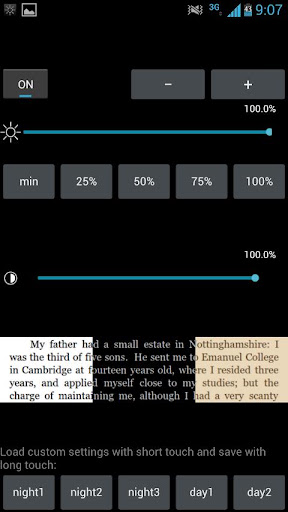
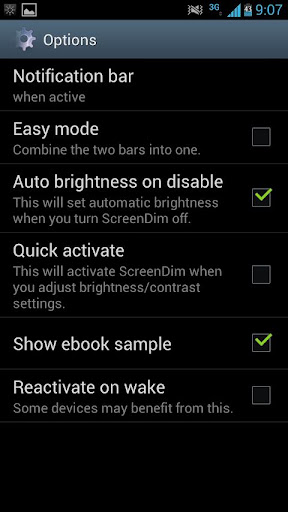
Is your minimum screen brightness still too bright? Dim your screen below what your device normally permits for comfortable use in darker environments, reading in bed, amateur astronomy, etc.! No root required.

Save your five favorite brightness and contrast settings as a preset, and get it back by touching a single button or by a Launcher shortcut (ScreenDim also provides a Launcher shortcut to cycle through the presets, and another Launcher shortcut to disable it).

ScreenDim also creates a notification item in your status bar so you can easily go back to it to adjust settings.

ScreenDim is the first dimmer that can both adjust backlight brightness below what the system normally permits on many LCD devices and dim the contrast. Some dimmers only filter and lower the contrast, which keeps the black areas unchanged and glowing gray on LCD devices when in the dark and doesn't save battery life (and at least one does it in a way that slows down 2D screen performance by about 30% in my testing). Many other dimmers only change the backlight within the range normally allowed by the OS.

I recommend you install ScreenDim Trial prior to purchasing the Full version to try it out for three days to ensure full compatibility with your device.

If you have any problems with ScreenDim, email arpruss@gmail.com before leaving poor feedback. There is a lot of variation in how different devices handle screen brightness, and I may be able to adjust ScreenDim to work better for you.

Note 1: On OLED devices, there is no backlight, so all adjustment is contrast-adjustment.

Note 2: If you set ScreenDim too dark for you to see the screen, you can recover by adjusting brightness with the volume buttons while in ScreenDim, or by tapping where the brightness adjust should be on the screen if you don't have volume buttons, or by rebooting your device (on many devices this is done by holding the power button for up to ten seconds to turn the device off and then by turning on the device).

What's in this version:

1.18: Tap outside to close compact view on Android 3.0+

Consider to support the developer if you like the app!

https://hotfile.com/dl/174600040/129cc54/dim.apk.html
http://depositfiles.com/files/rfmftz3a3
http://uplly.com/72q6jesu7ujz

Reddit News v5.20

Requirements: Android 2.2+

Overview: Officially the best new Reddit App for Android!

Officially the best new Reddit app according to r/android!

Officially the best new Reddit App for Android! See the discussion on r/android:

http://www.reddit.com/r/Android/comment ... confidence

A full featured Reddit browser with a user interface fully optimised for touch screens. It makes browsing Reddit on your phone an absolute pleasure.

"Reddit News Is The Best Free Reddit App For Android" -RedmondPie
http://www.redmondpie.com/reddit-news-i ... r-android/

Features:

- pre-fetching of images for quick viewing right from the stories list

- Stories and comments load at the same time. Switch between the two by sliding up and down the voting bar. (see market pic)

- View profiles, edit and delete comments, check your inbox, submit posts and more...

- Hi-res thumbnails created from pre-fetched images

- New Ice Cream Sandwich theme

- Rage faces and MLP emotes in comments with alternate text

- Drag and drop sortable Subreddits, move your favorites to the front.

- multiple colour themes including black,white,blue and pink

- Search Reddit for a specific topic.

- Optimized portrait and landscape layouts.

- butter smooth scrolling!

- optimized for dual core devices

What's in this version:

-added fix for force close issue on JellyBean Roms: http://code.google.com/p/android/issues ... d=35466#c2. This was causing ALOT of force closes.

-improved saving state when returning to app

-fixed 'null' showing as title when returning to app

-added search function to search for words within comments

-fixed force close when trying to reply to a message in advanced mode

-fixed back button behaviour when in fullscreen mode in dual pane tablet layout.

play:


Code:

https://play.google.com/store/apps/details?id=reddit.news


Download:

http://www.directmirror.com/files/1NL2WKTT

Dropsync v2.3.4 + Dropsync PRO Key v2.3

Requirements: Android 2.0+

Overview: Rock-solid, battery efficient, full two-way(!) sync client for Dropbox.

Keep your phone/tablet and your Dropbox in sync at all times. Rock-solid, battery efficient, full two-way(!) sync client for Dropbox.

"Just like the desktop version of Dropbox, Dropsync supports true two-way data synchronization." --New York Times

"Take a picture on your phone and watch as it’s already waiting for you on your laptop when you get home." --phandroid .com

"I bought 5 other apps like this one, but this is the only one that didn't crash while synchronizing my large Photo & Video folder" --One satisfied user

"Must have app. Now my phone - computer - tablet are one!" --Another satisfied user

FEATURES INCLUDE

* Full two-way sync. Just like Dropbox on desktop

* Instant upload: new files (for example photos) are uploaded to Dropbox immediately, no need to wait for the next autosync cycle

* Very efficient, consumes almost no battery if there is no change detected and will not slow down your phone either

* Very easy to set up. Once set up files will be kept in sync without any effort from users

* Works reliably under ever changing network conditions on your phone

* Monitors battery level, WiFi/3G/4G/WiMax connectivity and adapts its behavior according to user preferences

* Configurable autosync interval: 15 minutes, 30 minutes, every hour,...

* Tasker/Locale plugin to allow power users to define sophisticated sync schedules and conditions

* Compact code size, memory efficient, no fancy graphics, no useless animation. We have enough bloatware. Do one thing and do it best

Beware that there are many apps out there on the Market which claim doing sync but in fact what they do is one-way upload or download.

Dropsync provides the essential feature, two-way sync, which should be in the official Dropbox for Android since the beginning. For whatever reason it wasn't and still isn't. Now you have it.

If you are a serious Dropbox user and want more flexibility, please consider upgrading to PRO version.

PRO FEATURES INCLUDE

* Sync multiple folders

* Sync the whole Dropbox with a folder on your phone or tablet

* Upload files larger than 5 MB

* No ads, of course

We are proud of delivering great technical support, to all users, free and paying. If you run into any problem or have questions/suggestions, don't hesitate to contact us via email at dropsync@ttxapps.com. You can do so from within the app itself, just go to Settings -> Support.

What's new in this version:

Version 2.3.4

* Fixed a weird crash on Nook devices

* Fix: instant upload does not work 100% on some devices

* Warn users about potential issues with trailing spaces in Dropbox folder names

* Couple of small robustness improvements

play:


Code:

https://play.google.com/store/apps/details?id=com.ttxapps.dropsync


Download:

http://www.directmirror.com/files/OLYRHAQD

Destroy Gunners Z v2.1.0

Destroy Gunners Z v2.1.0
Requirements: Android 2.2+
Overview: This is the newest "Destroy Gunners Series".

The newest game in the highly popular "Destroy Gunners"


series of 3D action shooting games,

with over 2,800,000 downloads worldwide.

Nurture bonds with your comrades and fight for survival!

Use many different weapons with your mech.

Challenge missions, smash enemies and tackle huge bosses.

Intuitive touch controls make the game easy to enjoy.

This game also introduces a strategic map, allowing

players to capture territory and expand their area of

influence.

The game blends action and strategy for a new kind of

gameplay.

Also,introducing long-awaited social networking service

components.

Players can assign their registered friends' mechs as

wingman.

Your friends' mechs can go with and help you on special

missions such as boss

battles, and can even give you special parts.

This cooperation makes capturing territory more

exciting!

[Note]

・In order to play Destroy Gunners Z, you will need to

 log into GREE. Registration is free.

・This game needs to connect to the server.

 The first load may take a little while.

[SYSTEM REQUIREMENTS]

・Required OS: over Android 2.2(2.3recommended)

・Required Resolution: Over 800×480 pixel+

This game has NO advertisements

More Info:


Code:

https://play.google.com/store/apps/details?id=jp.shade.DGunsZ&feature=more_from_developer


Download Instructions:
http://ul.to/zl096xnz
http://turbobit.net/wu6jjiro98cx.html
http://depositfiles.com/files/cg3vmz547

3D Halloween Pumpkin Wallpaper v3.0 Android

3D Halloween Pumpkin Wallpaper v3.0
Requirements: Android 2.2+
Overview: 3D Halloween Pumpkin Live Wallpaper exclusively for android devices.

3D HALLOWEEN PUMPKIN

*New from ANDROID WAX*

★ We promise smooth animation and the best Halloween live wallpaper you will find.

★Visit our mobile website to make your phone shine★

Press here --> http://www.androidwax.com <--

Halloween is almost here! Check out our Halloween live wallpapers listed below if you truly want your device to stand out. Our ratings speak for itself.

Torment

Hellfire

House of Terror

Fire Glow

Fallen Angels

3D Halloween Pumpkin

Get full version for only $1.99

Get into the Halloween spirit with our 3D Halloween live wallpaper with color changing pumpkins exclusively for android devices. A true 3D Halloween pumpkin scene with many color customizations for pumpkins, candles, and landscapes. Runs on all high and low end devices using the latest in OpenGL technolgy for smooth animation and life like scenes. Battery consumption is not a problem because 3D Halloween Pumpkin is designed to run with very little cpu power and low battery consumption. Comes with true to life candle flicker that you have to see to believe.

★ Original artwork

★ Bright Vivid colors

★ Open GL

★ Home screen scrolling supported

★ HDMI supported (HD Televisions)

★ Landscape mode supported

★ Many backgrounds

★ Many preference options

★ Low file size

★ Minimum battery usage

Android Wax (Make Your Device Shine)
http://www.androidwax.com

We have the best live wallpapers and the best free live wallpapers on Google Play

Makes an awesome Halloween live wallpaper, pumpkin, candles, and flame theme.

This App has NO advertisements

More Info:


Code:

https://play.google.com/store/apps/details?id=org.androidwax.realpumpkin


Download Instructions:
http://turbobit.net/ifk1spcr34kk.html
http://depositfiles.com/files/hiv4ep9i0